

WILD HEARTS™
KOEI TECMO GAMES CO., LTD.
Master ancient tech to hunt down giant beasts. WILD HEARTS™ is a twist on the hunting genre where technology gives you a fighting chance against giant nature-infused beasts. Hunt alone or with friends.
Instant PlayNo download, stream instantly
Get the Vietnamese translation Vietnamese translation by The Red TeamOfficial partner
Vietnamese translation by The Red TeamOfficial partnerOverview
Play WILD HEARTS today!
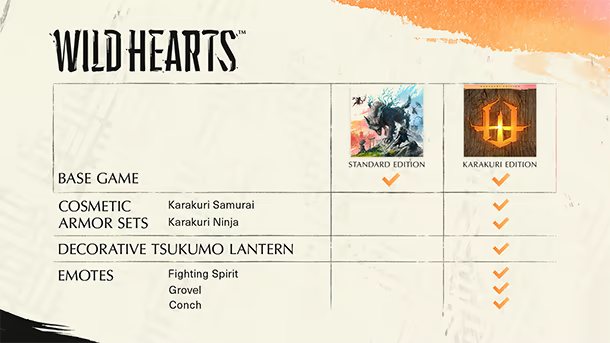
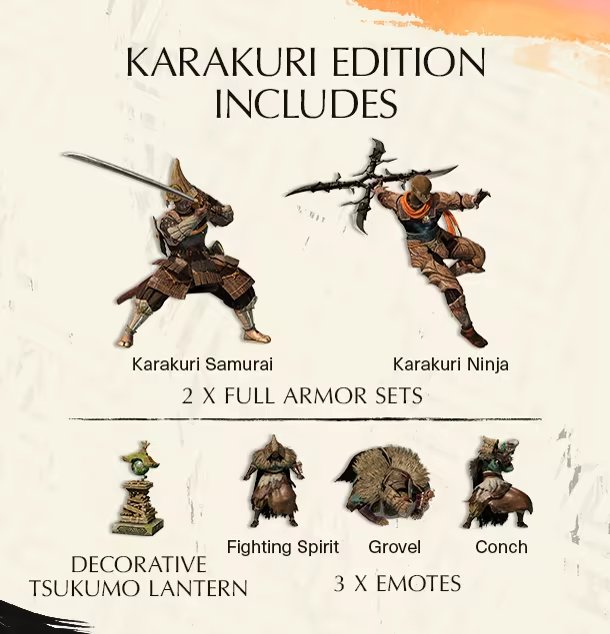
WILD HEARTS Karakuri Edition includes:
- 2 full cosmetic armor sets (Karakuri Samurai + Karakuri Ninja)
- A Decorative Tsukumo Lantern
- 3 Emotes (Fighting Spirit, Grovel, Conch)
About the Game
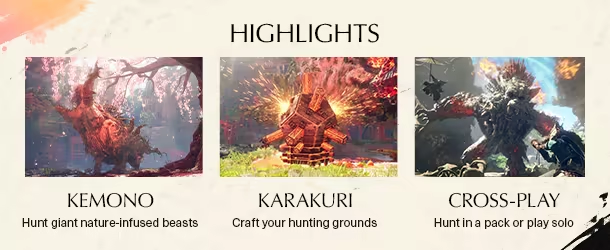
WILD HEARTS™ is a unique twist on the hunting genre, where technology gives you a fighting chance against fearsome beasts infused with the ferocious power of nature itself. Take on these creatures alone or hunt with friends in seamless co-op.
No one remembers why the Kemono began their rampage through a once-prosperous Azuma. Fueled by desperation, they wield the power of primal nature at its most destructive. For a while, it seemed that none could stand against their overwhelming might. But hope arrives in the form of a formidable hunter armed with deadly weapons and ancient technology called Karakuri that could turn the tide of battle.
Developed for this generation of platforms by Omega Force, the Japanese studio behind the DYNASTY WARRIORS franchise, WILD HEARTS™ takes you on an epic adventure set in a fantasy world inspired by feudal Japan.
Note: Features such as, but not limited to, Narrated Game Menus, Chat Text to Speech, and Chat Transcription are available in English only.
The feel
HardcoreTenseFantasy
Genres
ActionAdventure
Tags
3DActionAction-AdventureAdventureBuildingCo-opColorfulCraftingCreature CollectorDragonsExplorationFantasy
Ways to play
- Single-player
- Multiplayer
- Co-op
- Controller
Weak PC? It still plays
Download the translation, then play WILD HEARTS™ on Cloud PC
WILD HEARTS™ needs at least 12 GB of RAM and 6 GB of VRAM. Cloud PC is a Windows computer with a strong GPU in the cloud. You control it from your laptop, phone or desktop.
1
Turn on Cloud PC
Log in to Thinkmay and start your machine. You get a Windows desktop of your own.
2
Install the game and the translation
Install the game from Steam as you would at home, then download the translation on this page and copy it in.
3
Play in Vietnamese
Play on a laptop, phone or desktop. Controllers and microphones work.
More from KOEI TECMO GAMES CO., LTD.

Nioh 3 Demo

DOA6LR Character Unlock Key: Minato + Debut Costume Bundle

DOA6LR Kokoro Harmonieuse Bundle

Atelier Meruru ~The Apprentice of Arland~ DX

DYNASTY WARRIORS: ORIGINS

Attack on Titan 2 - A.O.T.2

Romance of the Three Kingdoms XI with Power Up Kit

DRAGON QUEST BUILDERS™ 2

Atelier Ayesha: The Alchemist of Dusk DX

Atelier Rorona ~The Alchemist of Arland~ DX

Fate/Samurai Remnant

Atelier Ryza 2: Lost Legends & the Secret Fairy DX
Games with a similar feel
Hardcore · Tense · Fantasy

Godfall Ultimate Edition

The First Berserker: Khazan

FlyKnight

Stray Blade

The Summon

God of War Ragnarök

Monster Hunter Stories 2: Wings of Ruin

The Lord of the Rings: Return to Moria™

AdventureQuest 3D

Wayfinder

RuneScape: Dragonwilds

God of War

Crimson Desert Enhanced

Black Myth: Wukong

The Swordsmen X: Survival

MONSTER HUNTER RISE

Monster Hunter Stories

Death's Door

Rise of the Ronin

Dragon's Dogma 2

Nioh: Complete Edition

Curse of the Dead Gods

WarOfGods 2
