

The Doll's Window
ujumiru
A horror exploration game that takes place in an underground labyrinth. Avoid malicious creations that are hungry for your soul. Depart from the nightmares that constantly haunt you.
Instant PlayNo download, stream instantly
Overview
Alva follows a mysterious girl named Elma, who may be an end to their despair.
Elma latches onto Alva, who holds the key to her release.
Together, they try to escape the labyrinth lying under the pretense of a circus.
Together, they try to find a way to be freed.
♢♢♢♢♢
A horror exploration game that takes place in an underground labyrinth.
Navigate your way through various traps and mazes.
Dodge malicious creations that are perpetually hungry.
Depart from the nightmares that constantly haunt you.
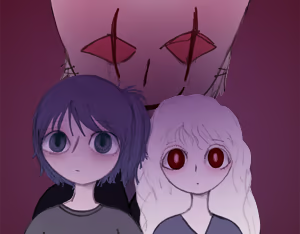
Elma latches onto Alva, who holds the key to her release.
Together, they try to escape the labyrinth lying under the pretense of a circus.
Together, they try to find a way to be freed.
♢♢♢♢♢
A horror exploration game that takes place in an underground labyrinth.
Navigate your way through various traps and mazes.
Dodge malicious creations that are perpetually hungry.
Depart from the nightmares that constantly haunt you.
Features
- Advance through different levels of the labyrinth.
- Uncover stories and converse with others to survive.
- Solve puzzles by finding bits of what's past.
- Find another puzzle within a puzzle.
- Try and stop the memories that torment you.
- Avoid those who are eager to consume your soul.
Controls
- Arrow keys — Movement
- Enter or Space bar — Interact
- Save — Interact with Rabbit Dolls
- X or Escape — Check Inventory
- W or F12 — Return to Title screen
- F5 — Toggle Fullscreen/Window modes
- F1 — View/Change display settings
To use Steam Overlay, please change the screenshot key settings
to another key other than F12, F5, or F1.
The feel
AtmosphericScaryTenseHorror
Genres
AdventureFree to PlayIndieRPG
Ways to play
- Single-player
- Controller
Weak PC? It still plays
Play The Doll's Window on a weak PC
The Doll's Window needs at least 512 MB of RAM. Cloud PC is a Windows computer with a strong GPU in the cloud. You control it from your laptop, phone or desktop.
1
Turn on Cloud PC
Log in to Thinkmay and start your machine. You get a Windows desktop of your own.
2
Install the game
Install The Doll's Window from Steam as you would at home.
3
Play on any device
Play on a laptop, phone or desktop. Controllers and microphones work.
Games with a similar feel
Atmospheric · Scary · Tense · Horror

Saihate Station

Parasomnia

Gas Station Horror

怪話2

The woods

Silent Wounds - The Doll

Missing Hiker

Depths' Tale

Webs of Reverie

Dark Fracture Demo

Soul of the Forest

3AM CORP: The Balbazar Resort

Aokigahara :The death forest

Anomaly Watchout!

Fears to Fathom - Home Alone

Pale Abyss - Prototype

Neverway

Deep Sleep: Labyrinth of the Forsaken

Fabled Lands - The Castle of Lost Souls

BLACK SOULS

[Nightmare Files] Clap Clap

Siren Head: The Horror Experience

Garten of Banban 0
