

PunchMonkey
TeamSeWoo
Keep a little monkey and a banana tree on the corner of your desktop. Every key you type makes the monkey punch the tree and knock down ripe bananas. Spend them to decorate your mouse cursor. Punch together with your Steam friends, too.
Instant PlayNo download, stream instantly
Overview
This game only counts how many times you type and click. It never reads which keys or buttons you press or where your mouse is — and it never stores or sends that information anywhere.
To keep your bananas and cursor decorations safe, our game server stores your Steam account ID and your game progress (balance, tree, upgrades). See the privacy notice for details.
PunchMonkey is an idle game that lives on your desktop. No window to babysit. Work, code, chat as usual — the monkey keeps itself busy in the corner of your screen.
Every keystroke or click makes the monkey punch the tree. Bananas ripen over time on their own, and a ripe bunch drops after ten hits. The tree keeps growing while you're away — come back and harvest.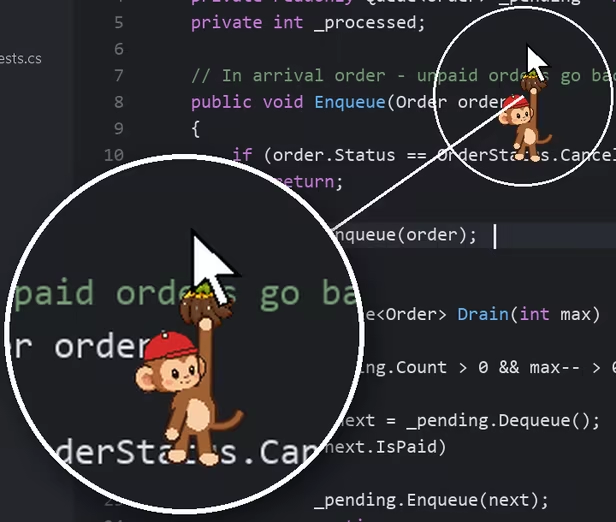
A banana dangles from the tip of your cursor, and a monkey hangs from it wherever you go. It sways as you move, loses its grip when you fling the mouse and climbs back up, cheers when you type, and dozes off when you rest.
Spend bananas to customize three slots — monkey, banana and decoration — with more arriving in updates. Your actual cursor stays the standard Windows cursor; the monkey just tags along. Everything you collect goes into your Steam inventory.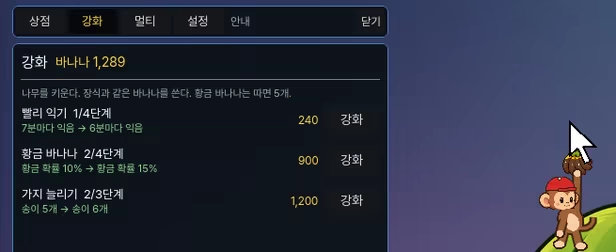
Faster ripening, golden bananas (worth ×5), more branches. Decorations first or a bigger tree first? Your call.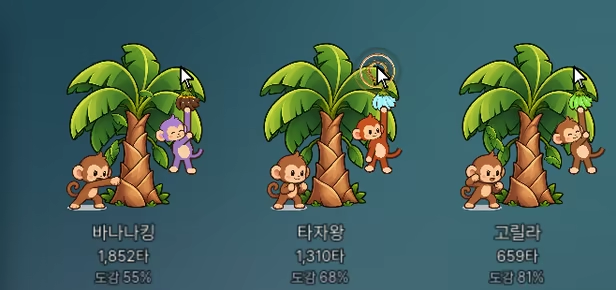
Gather in a lobby with Steam friends and their monkeys and trees appear on your desktop as small windows. Drag them anywhere. See who punched the most on the lobby leaderboard.
From your first thousand to a million punches — 10 achievements.
To keep your bananas and cursor decorations safe, our game server stores your Steam account ID and your game progress (balance, tree, upgrades). See the privacy notice for details.
PunchMonkey is an idle game that lives on your desktop. No window to babysit. Work, code, chat as usual — the monkey keeps itself busy in the corner of your screen.
You type, it punches
Every keystroke or click makes the monkey punch the tree. Bananas ripen over time on their own, and a ripe bunch drops after ten hits. The tree keeps growing while you're away — come back and harvest.
A monkey hangs from your cursor
A banana dangles from the tip of your cursor, and a monkey hangs from it wherever you go. It sways as you move, loses its grip when you fling the mouse and climbs back up, cheers when you type, and dozes off when you rest.
Spend bananas to customize three slots — monkey, banana and decoration — with more arriving in updates. Your actual cursor stays the standard Windows cursor; the monkey just tags along. Everything you collect goes into your Steam inventory.
Grow your tree
Faster ripening, golden bananas (worth ×5), more branches. Decorations first or a bigger tree first? Your call.
Punch together
Gather in a lobby with Steam friends and their monkeys and trees appear on your desktop as small windows. Drag them anywhere. See who punched the most on the lobby leaderboard.
Stays out of your way
- Stays on top of your other windows. Only the monkey and tree catch your clicks — click anywhere else and the click goes through to the window underneath
- Can hide while fullscreen games or videos are running (option)
- Hide to tray, launch with Windows, adjust size and opacity
- Built to run light
From your first thousand to a million punches — 10 achievements.
The feel
ChillCozy
Genres
CasualSimulation
Ways to play
- Single-player
- Multiplayer
- PvP
Weak PC? It still plays
Play PunchMonkey on a weak PC
PunchMonkey needs at least 1 GB of RAM. Cloud PC is a Windows computer with a strong GPU in the cloud. You control it from your laptop, phone or desktop.
1
Turn on Cloud PC
Log in to Thinkmay and start your machine. You get a Windows desktop of your own.
2
Install the game
Install PunchMonkey from Steam as you would at home.
3
Play on any device
Play on a laptop, phone or desktop. Controllers and microphones work.
Games with a similar feel
Chill · Cozy

Needle In A Haystack

Gas Station Simulator: Prologue - Early Days

依灵餐厅

Sort The Toys

Desktop Tiny Tides

Plushy Store Tidy Up

Abandoned Gameshop

Dewdrop

Gallery Organizer

Window Aquarista

Guildream

Boba Tea Shop Simulator

Bunker Tidy Up

Raw Egg Peeling

My First Ant Farm

Dressmaker

Cards Everywhere!

Woman Life Simulator

Post Office: Tidy Up

Banker Simulator

Vibe Lab: Idle Dev Sim

Childhood Slots

Life Makeover
