

Acro FS
Knife Edge Software
Acro FS is a recreational, stick-and-rudder flight simulator for high-performance aerobatic aircraft. Practice your routine, race against the clock, or just get up there and fly - the checklist is done and the engine is running.
Instant PlayNo download, stream instantly
Overview
By Aviators, For Gamers

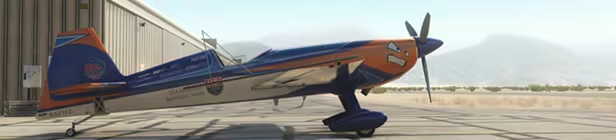
Acro FS is a stick-and-rudder aerobatic flight simulator created by Jim Bourke, airshow pilot and member of the US Unlimited Aerobatic Team. Designed from the ground up to accurately simulate aerobatic flight, it allows you to experience what it’s like to strap into a high-performance stunt plane and take to the sky. Take control of an aerobatic airplane, throttle up, and discover what you can do. There’s no navigation, no radios - just a lot of horsepower in a state-of-the-art aircraft.
Exciting Features
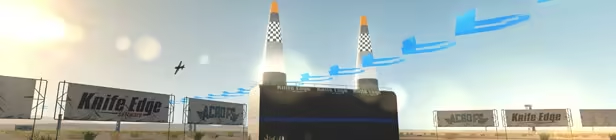
- High Speed Racing: Challenging Entertainment
- Virtual Reality Immersion: Oculus, SteamVR, or Windows Mixed Reality
- Expansive World Design: Hundreds of Thousands of Square Miles to Explore
- Environmental Controls: Wind, Precipitation, Daylight At Your Command
- Stunning Visual Detail: Powered by Unigine2
- Impressive Physics: Accurate, Predictive, Component Based Simulation
- Multi-controller Support: Use Your Multi-USB Cockpit System
Controller Required!

Acro FS requires a controller to fly. For good control, you'll need a 4-axis controller. A gamepad will work, as will "3D" flight sticks that include pitch, roll, yaw, and throttle. For best results, you can also use an RC-style controller that places these controls on two sticks, or muliti-USB systems with stick, throttle, and rudder pedals.
The feel
RelaxingChill
Genres
SimulationEarly Access
Tags
Early AccessFlightFree to PlaySimulationVR
Ways to play
- Single-player
Weak PC? It still plays
Play Acro FS on a weak PC
Acro FS needs at least 2 GB of RAM and 2 GB of VRAM. Cloud PC is a Windows computer with a strong GPU in the cloud. You control it from your laptop, phone or desktop.
1
Turn on Cloud PC
Log in to Thinkmay and start your machine. You get a Windows desktop of your own.
2
Install the game
Install Acro FS from Steam as you would at home.
3
Play on any device
Play on a laptop, phone or desktop. Controllers and microphones work.
Games with a similar feel
Relaxing · Chill

Mandate of Galactic Empires

Truck Simulator 2026: USA

LUGANO BAY TYCOON

Car Dealer's Life

Bank King Simulator

DESIRO.

Desktop Portal

Tower Networking Inc.

TCG Multiplayer Card Shop Simulator

Home Wind

Planetary Factory - An Idle Automation Game

The Uncertain: VR Experience

Havelyn

Star Rangers VR - Free Demo

Arcadius

Metropolis 1998

Snow Resort Simulator

Tarot: Deck of Celestials

SoundStone

Reality Blender

WGT Golf

Country Town Trains

DeskPets - Desktop Idle Companion
