

Screen Regions
Kyle Klassen
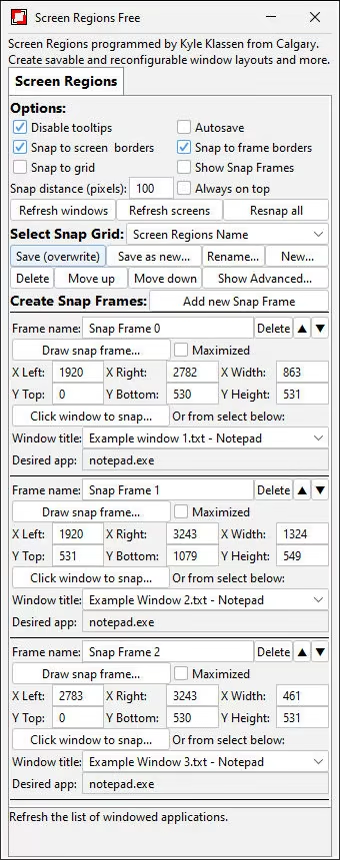
Screen Regions is a free utility that allows you to create and save window layout arrangements. You can save a layout and then pick it again later and instantly snap all your applications' windows to their saved locations with the "Resnap all" button.
Overview
Screen Regions is a free utility that allows you to create and save window layout arrangements. This is most useful for people who use multiple monitors, especially 3 or more. and who do tasks having a large number of different windows open at once. With Screen Regions you can save a layout and then pick it again later and instantly snap all your windows to their saved locations by clicking the "Resnap all" button. And they don't have to literally be the same windows- Screen Regions intelligently guesses which windows should go where based on which applications' windows you had saved where.
Genres
Weak PC? It still plays
Play Screen Regions on a weak PC
Cloud PC is a Windows computer with a strong GPU in the cloud. You control it from your laptop, phone or desktop.
Turn on Cloud PC
Log in to Thinkmay and start your machine. You get a Windows desktop of your own.
Install the game
Install Screen Regions from Steam as you would at home.
Play on any device
Play on a laptop, phone or desktop. Controllers and microphones work.
Games with a similar feel

PinoVMT

Unitra: Real-Time Voice Translation For Gamers

Driver Booster for Steam

DeskFamiliar

Pocket Chief!

Evymind Clips: Automatic Highlights & Shorts

Special K

JSAUX PIXEL

RetroArch - A5200

Agebringer

20 More, Somehow Even Smaller, Mazes

市町村麻雀

Crystal Chatbox

AKASHA

Desktop Mate

推しマスコット - 姫生のーむ

Wallpaper Play

推しマスコット

Pomoroid

MOBA Manager 2026

DSARTS

Dream Simulators

LET IT DIE: Offline Key
